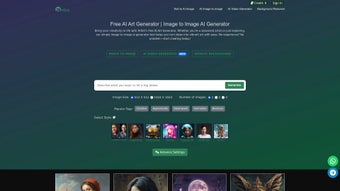

Download Artbit – AI Art Generator, Free Online Tool
Introduction
In the fast‑moving world of digital creation, designers, marketers, and hobbyists alike are constantly searching for tools that can turn a simple idea into a polished visual without the steep learning curve of traditional software. AI‑driven art generators have emerged as a powerful answer, allowing anyone with an internet connection to produce high‑quality images, enhance existing photos, or even generate short video loops in a matter of seconds. Yet many of these platforms still demand downloads, powerful GPUs, or complex licensing agreements that can deter casual users.
Artbit addresses those pain points head‑on by delivering a fully browser‑based solution that is secure, multilingual, and equipped with a generous free tier. Whether you are drafting a concept for a client presentation, creating a social‑media graphic on the fly, or experimenting with animated storytelling, Artbit provides a seamless, “zero‑setup” experience that aligns with modern workflow expectations. In this review we will explore how Artbit works, dive deep into its core capabilities, walk through the onboarding process, weigh its strengths against its limitations, and answer the most common questions prospective users have.
By the end you’ll know exactly why Artbit deserves a spot in your creative toolbox and how to get started without spending a dime.
Overview & Key Features
Artbit is a cloud‑powered AI art generation platform that operates entirely within a web browser. The service eliminates the need for local installations, high‑end GPUs, or bulky libraries, making it accessible on any device that supports a modern browser. Its mission is to democratize creative AI by offering a secure, reliable environment where users can transform text prompts, uploaded images, or video sequences into professional‑grade visual assets. Because all processing occurs on Artbit’s servers, the user’s hardware specifications have minimal impact on performance—only a stable broadband connection is required. The platform also respects user privacy: data is encrypted in transit (TLS) and at rest, and uploaded files are automatically purged after the session unless saved to a personal library.
- Text‑to‑Image Generation: Provide a natural‑language description and the AI produces a high‑resolution image that matches the requested style, mood, and composition. Advanced parameters let you influence color palettes, lighting, and artistic influences.
- Image‑to‑Image Enhancement: Upload a low‑resolution sketch, photograph, or raster file and let Artbit upscale, recolor, or reinterpret it while preserving essential details. This is ideal for turning rough concepts into polished assets.
- Background Removal: One‑click segmentation isolates foreground subjects, delivering transparent PNGs ready for compositing, product mock‑ups, or marketing banners.
- Video Creation: Convert a series of prompts or image frames into short looping videos (MP4) with customizable duration and frame rate, useful for ads, intros, or social‑media reels.
- Multilingual Interface: The dashboard supports English, Spanish, French, German, Chinese, and Japanese, ensuring creators worldwide can work in their native language.
- Daily Free Quota: Every registered user receives a set number of free image generations each day, encouraging experimentation without immediate financial commitment.
- Secure Cloud Processing: End‑to‑end encryption protects proprietary concepts, and Artbit complies with GDPR and CCPA standards for data handling.
- Export Options: Results can be downloaded as PNG, JPEG, or MP4, with adjustable resolution (up to 4K) and compression levels for optimal file size.
- Responsive Design: The UI automatically adapts to desktops, tablets, and smartphones, delivering a consistent experience across Windows, macOS, Linux, iOS, and Android devices.
Beyond the listed capabilities, Artbit continuously refines its underlying diffusion and GAN models, ensuring that the output stays fresh, realistic, and stylistically diverse. For enterprises and developers, an API key unlocks programmatic access, allowing integration with content management systems, e‑commerce platforms, or custom design pipelines. This blend of power, accessibility, and ongoing innovation positions Artbit as a standout choice in the crowded AI art market.
Installation & Usage Instructions
Getting Started – No Installation Required
Because Artbit runs entirely in the cloud, the onboarding process is straightforward and can be completed in under five minutes. Follow these steps to begin creating:
- Open a supported browser (Chrome, Firefox, Edge, or Safari) and navigate to www.artbit.io.
- Click the “Sign Up” button and choose either an email/password combination or a social login via Google or Apple.
- Check your inbox for a verification email and click the confirmation link to activate your account.
- After logging in, you will be presented with the main dashboard, which features three primary modules: Text, Image, and Video.
- Select a module, enter your prompt or upload an image, and press the “Generate” button. The AI will begin processing in the background while a progress indicator shows estimated time.
- When the generation completes, review the preview pane. Use the “Refine” controls to adjust style, saturation, or detail level without restarting from scratch.
- Once satisfied, click “Download” to save the file locally, or use the “Share” button to publish directly to Instagram, Twitter, or LinkedIn.
Compatibility (Windows, macOS, Linux, iOS, Android)
Artbit’s responsive web app works on any operating system that supports a recent browser version, including Windows 10/11, macOS 10.15+ (Catalina), major Linux distributions, iOS 13+, and Android 8.0+. Since the heavy lifting occurs on Artbit’s servers, the local CPU, GPU, or RAM have little impact on generation speed. However, a stable broadband connection of at least 5 Mbps is recommended for smooth preview loading, especially when exporting high‑resolution images or 4K video loops.
Advanced Usage – API Integration
For teams that need to automate content creation, Artbit offers a RESTful API. After upgrading to a paid plan, navigate to the “Developer” tab in the dashboard, generate a unique API key, and follow the documentation to send POST requests containing JSON payloads with prompts, style parameters, or source image URLs. The API returns a signed URL pointing to the generated asset, which can be downloaded programmatically or embedded directly into web pages, email campaigns, or internal design tools. Rate limits are generous for enterprise accounts, and usage is billed based on the number of generated assets, providing predictable costs for large‑scale operations.
Pros and Cons
Pros
- Zero‑Setup: No downloads, installations, or hardware upgrades required; everything runs in the browser.
- All‑In‑One Platform: Text‑to‑image, image‑to‑image, background removal, and video generation are consolidated under a single UI.
- Generous Free Tier: Daily quota enables casual creators to experiment without spending money.
- Multilingual Support: Interface available in six major languages, widening accessibility.
- Secure Cloud Processing: End‑to‑end encryption safeguards proprietary designs.
- API Access: Enables seamless integration with existing workflows and automation pipelines.
- Regular Model Updates: Keeps output fresh, realistic, and aligned with the latest AI research.
- Responsive Design: Works flawlessly on desktops, tablets, and smartphones.
Cons
- Internet Dependency: Offline creation is impossible; a stable connection is mandatory.
- Limited Free Quota for Power Users: Heavy creators may quickly exhaust the daily allowance.
- Potential Latency on Complex Tasks: High‑resolution video rendering can take several minutes.
- Subscription Cost for Unlimited Access: Professional plans require a monthly or annual fee.
- Content Policy Restrictions: Certain copyrighted or disallowed subjects are filtered, limiting some creative scenarios.
Artbit delivers an impressive blend of power and convenience. Its browser‑first approach removes the friction of traditional software, while the breadth of features—from text‑to‑image to video generation—makes it a versatile tool for creators at any skill level. The free daily quota is generous enough for casual experimentation, and the paid plans are competitively priced compared with other AI art services. The main drawbacks are the reliance on an internet connection and the modest free limit for high‑volume users, but these are typical of cloud‑based AI platforms. Overall, Artbit stands out as a secure, multilingual, and feature‑rich solution that deserves serious consideration for both personal and professional projects.
Conclusion & Frequently Asked Questions
Artbit brings the future of AI‑driven creativity directly to your browser, offering a frictionless experience that rivals heavyweight desktop applications. Its robust feature set—including text‑to‑image, image enhancement, background removal, and video creation—covers virtually every visual need a modern creator might encounter. The free daily quota lowers the barrier to entry, while paid plans unlock higher resolutions, unlimited generations, and API access for teams seeking automation. Security, multilingual support, and responsive design further cement Artbit as a professional‑grade solution that doesn’t compromise on ease of use. If you’re ready to generate stunning visuals without the hassle of installations or expensive hardware, now is the perfect time to give Artbit a try.
Is Artbit really free to use?
Artbit offers a free tier that includes a daily allowance of image generations. This is ideal for casual creators who need occasional artwork. For unlimited access, higher‑resolution exports, or video generation, you can upgrade to a paid subscription.
Do I need any special hardware or GPU?
No. All AI processing occurs on Artbit’s cloud servers. A modern web browser and a stable internet connection are sufficient, regardless of whether you’re on Windows, macOS, Linux, iOS, or Android.
Can I use Artbit for commercial projects?
Yes. With a paid subscription you receive a commercial license that permits you to sell or distribute the generated assets. Always review the specific licensing terms in the user agreement.
How does the background removal tool work?
The tool uses a segmentation AI model that identifies foreground subjects and separates them from the background. With a single click the background becomes transparent, and you can download the result as a PNG ready for compositing.
Is my data safe when I upload images?
Artbit encrypts all data in transit (TLS) and at rest. Uploaded images are stored temporarily for processing and are automatically deleted after the session unless you choose to save them in your personal library.
Ready to turn your ideas into stunning visuals without installing a single program? Sign up for Artbit today and start generating beautiful art instantly.



.png)



